These apps let you use ADB without touching the command line
While ADB was made for developers, these tools are for everyone. I tested the best ones so you can take control of your phone.

ADB is a powerful tool that you can use to control your Android device and tweak hidden settings, but the command line can be too complicated for many.
These apps offer a GUI for ADB, allowing you to make use of ADBs powerful functionality without having to use the terminal.
- No setup needed: Tango ADB
- Most powerful Windows app: ADB AppControl
- Most powerful cross platform app: Xtreme ADB
- Slickest app: Android Toolbox
Tango
A brand new way of managing Android devices
Features
Instant
Plug in your android device with a USB cable and you are ready. No need for download or installation.
Secure
Tango works entirely in your browser. All data is transferred directly between your Android devices and your browser.
Powerful
File browser, App manager, Screen mirror and more features are waiting to be explored…
Platforms:
- Chrome: Yes

- Firefox: No

- Windows: Yes
- Linux: Yes
- MacOs: Yes
Licensing: Freemium, FOSS 


Screenshots

.png)


Android Toolbox
Android-Toolbox is a desktop app which enables the user to access android device features which are not accessible directly from the mobile device.
What does it do?
Current features:
- You can now perform some file management tasks (External SD card supported)
- Reboot to system, recovery, fastboot, bootloader or simply power off using the power controls
- You can offload, suspend, un-suspend, install, uninstall, kill or recompile apps.(Apps are currently shown as package names only. I couldn’t find a way to get app titles without pushing aapt to the mobile device.)
- Support for installing split apks and batch install apk*(Coming Soon)*
- Bloatware or other system apps can now be uninstalled
- Full Windows Subsystem for Android (WSA) compatibility (WSA is retiring on March 5, 2025)
- More soon…
Platforms:
- Windows: Yes
- Linux: Planned

- macOs: Yes
Licensing: FOSS
Screenshots


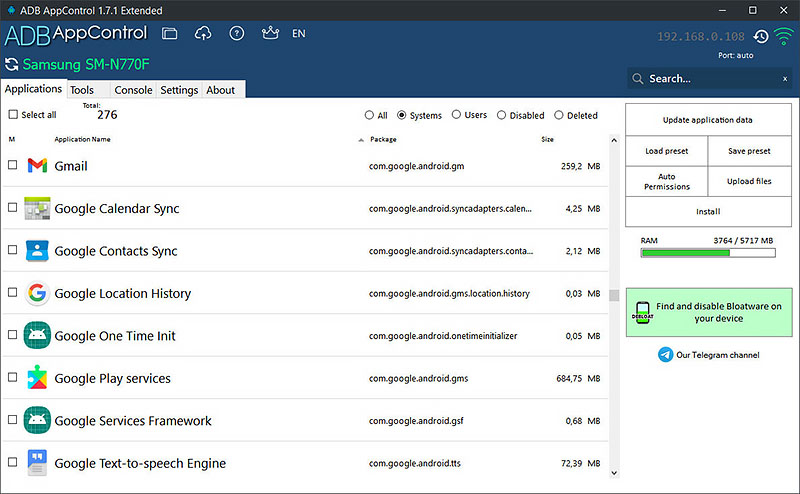
ADB AppControl
ADB AppControl is a powerful application manager for Android.
It offers a clean and modern graphical interface for working with ADB and automates batch operations to manage apps across Android device.
Features
App Control
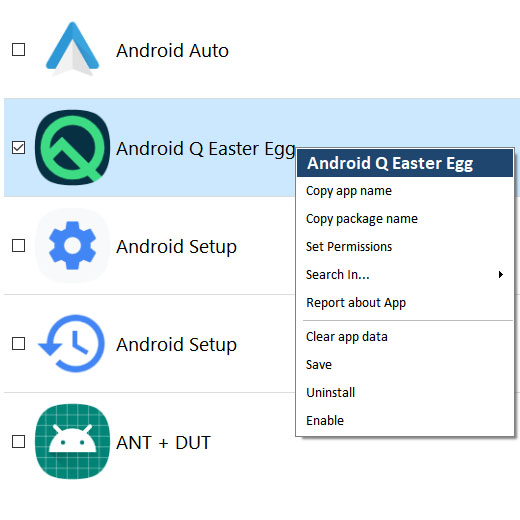
- Disable and uninstall applications without root
- Multiple apps installing
- Full Split installation support (APKS)
- Saving APK files of installed applications
- Permissions Manager for applications
- Saving and loading applications list-presets
- Quick search for apps on Google Play, ApkMirror, F-Droid and others
Useful tools
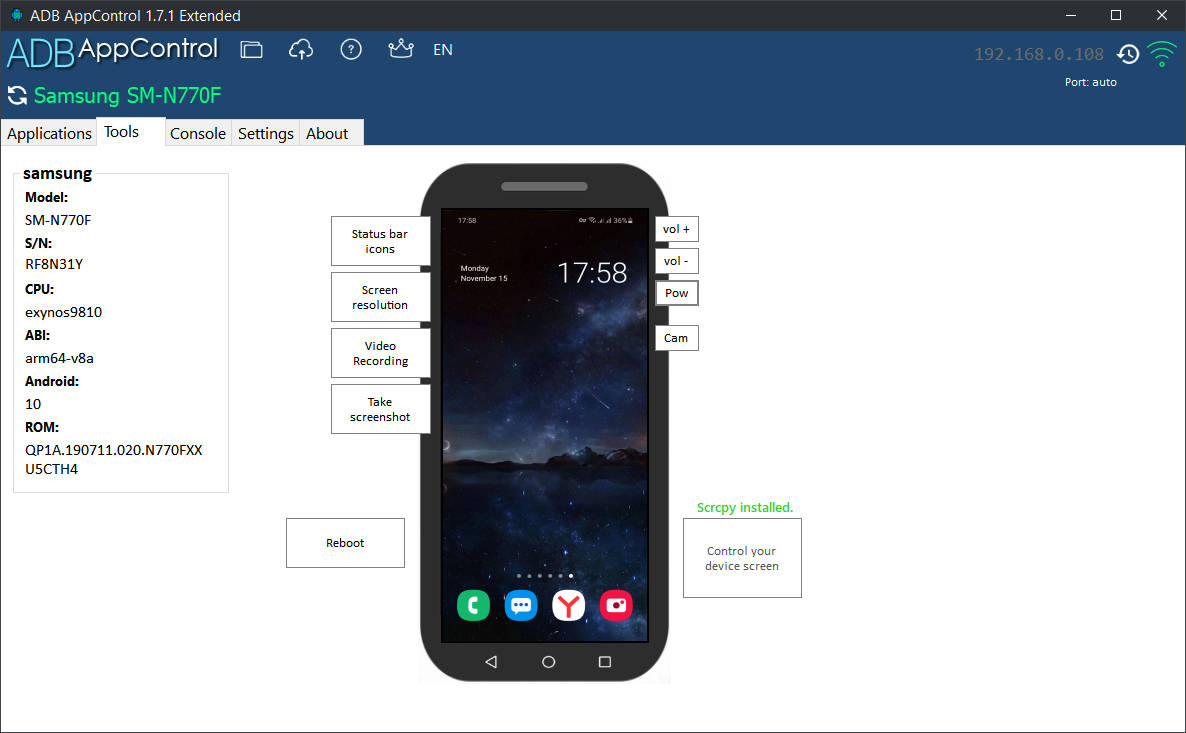
- Displaying device information
- Changing the screen resolution and DPI
- Hiding icons in the status bar
- Device remotely control
- Virtual volume, power, camera and navigation buttons
- Creating screenshots of the device screen
- Quick reboot in recovery and bootloader
Advanced
- ADB Console with favorites commands
- Fastboot support
- Logcat logs
- Auto permission granting for popular apps (Tasker, Battery Stats, etc.)
- Simple file upload
- Extended Settings
Platforms:
- Windows: Yes
- Linux: No
- macOs: No
Licensing: Freemium
Screenshots

Xtreme ADB
The Ultimate ADB GUI Wrapper. Manage your Android devices with ease — no terminal required.
Features
- Modern UI: A clean design with full Light/Dark mode support.
- Live Dashboard: Real-time monitoring of Battery and RAM.
- App Manager: Bulk install APKs, uninstall system apps, force stop, and extract APKs to PC.
- File Explorer: Full GUI file manager to Copy, Paste, Rename, Delete, Upload, and Download files.
- Fastboot & Recovery: Boot live images without flashing, flash recovery/boot, and sideload ZIPs.
- Wireless ADB: Built-in pairing tool for Android 11+ (Pairing Code support) and TCP/IP toggler.
- Tweaks: Change DPI, Resolution, Animation Scales, and toggle visual pointers.
- Backup & Restore: Create full system backups (
.abfiles) and restore them. - Logcat: Color-coded (*In Dark Mode only) real-time log stream to easily spot errors.
Platforms:
- Windows: Yes
- Linux: Yes
- macOs: Yes
Licensing: FOSS
Screenshots


ATA GUI
ATA-GUI is an app that lets you perform advanced tasks on your Android™ device with ease. You can use ATA-GUI to access and modify your device’s system settings, files, and features. You can also use ATA-GUI to install, uninstall, and restore apps on your device.
Features
- Manage System/User Applications Without Root:
- Uninstall applications
- Clean data
- Enable/disable apps
- Install Applications and Upload Files Seamlessly
- Check and Manage Permissions for Any Application
- ADB Over Network with Easy and Fast Pairing
- Detect and Remove Bloatware
- Reboot into Recovery, Fastboot, and System Modes
- Flash and Extract Images
- Erase User Data and Cache
- Screen and Camera Mirroring
- Unlock and Lock Bootloader (device dependent)
- Extract Device Information in System and Fastboot Modes
- Sideload ZIP Files Easily
- Execute Custom Commands
- Inject Text
- Access and Analyze Logcat
- Integrated Task Manager
- Grant WRITE_SECURE_SETTINGS and DUMP Permissions
- Retrieve OEM Device ID
- Support for Multiple User Devices
- Support for enviroment variables
- Auto USB device detection
Platforms:
- Windows: Yes
- Linux: No
- macOs: No
Licensing: FOSS
AYA
AYA is a desktop application for easily controlling android devices, which can be considered as a GUI wrapper for ADB.
Features
- Screen mirror
- File explorer
- Application manager
- Process monitor
- Layout inspector
- CPU, memory and FPS monitor
- Logcat viewer
- Interactive shell
Platforms:
- Windows: Yes
- Linux: Yes
- macOs: Yes
Licensing: FOSS
Screenshots